

Pick Lightworks if you want a free or pay-once editor built for fast keyboard cutting that also runs on Linux and on Windows 10; pick Premiere Pro if your work depends on automatic captions, AI masking and the Adobe projects your clients and team already pass around. The historical reviews below favour Premiere, with a median 4.5 out of 5 against 3.0 for Lightworks. Their scores and render times predate Lightworks 2026.1, so I'd make this choice on the workflow you need, then compare a short export on current versions if speed matters.
Lightworks offers a zero-cost route and a pay-once licence, with a Free plan that exports 1080p and a Pro licence you can buy once for €440, while Premiere is sold only as a Creative Cloud subscription, at a regular US$263.88 for an annual prepaid plan before tax. Adobe now calls the program Adobe Premiere on its plans and help pages; it's the same app, now at version 27.0, released in November 2026.
I'd start with Lightworks Free if you're learning to edit or cutting interviews, documentaries and long YouTube videos on a budget, because the Free plan has no time limit and trimming has long been Lightworks' strongest tool. I'd pay for Premiere the day a client, school or employer sends you Premiere projects or wants captions in several languages, because Lightworks reads Premiere work only through an exported XML or AAF file and has no automatic captions.
| Question | Lightworks 2026.1 | Premiere 27 |
|---|---|---|
| Price | Free; Create €18 a month, €145 a year or €215 once; Pro €32 a month, €250 a year or €440 once (EUR, before sales tax) | US$22.99 a month on an annual billed-monthly plan or a regular US$263.88 prepaid for a year; tax and conditional offers can change checkout totals. Monthly plans are also available; subscription only |
| Free option | Free plan with 1080p MP4 export, portrait included, renewed by signing in every 90 days | 7-day trial that turns into a paid plan unless you cancel |
| Runs on | Windows 10 or later, macOS 12 or later, Ubuntu, Mint and Fedora | Windows 11 24H2 or later, including Snapdragon X laptops, and macOS 15 Sequoia or later on supported Apple silicon; no Linux |
| Captions and AI | No automatic captions and no built-in motion tracking or stabilisation | Speech to Text captions, translation into 27 languages, text-based editing, Object Mask tracking, Warp Stabilizer and Generative Extend |
| Historical 1080p render (2025 reviews) | 117 seconds (2025.1 on Create) | 35 seconds (2025 review) |
| Project exchange | Imports Premiere XML and AAF on every plan; exports AAF, XML, OMF and EDL on Pro | Exports Final Cut Pro XML, AAF, EDL and OTIO |
| When you stop paying | A bought licence keeps working, offline too; a lapsed subscription drops back to Free | Access ends with the billing period |
| Published scores | 3.0 editorial median; platform-weighted user score 3.9 from 65 entries | 4.5 editorial median; platform-weighted user score 4.6 from 2,249 entries |
| Best for | Keyboard cutting, interviews and documentaries, Linux, tight budgets | Captioned social video, client and agency work, Adobe pipelines |
What changed in Lightworks 2026.1 and Premiere 27
Most comparisons in search results were written before either current version, so a few of their verdicts no longer hold. Lightworks 2026.1 became the stable release on 19 October 2026, and the official What's New page for 2026.1 lists the changes that matter for this choice:
- Free exports 1080p and portrait. Older comparisons still quote a 720p ceiling for Free, which no longer applies.
- Trimming rebuilt. Lightworks rebuilt its trimming from the ground up to make it faster and more predictable.
- Speed, Reframe and safe areas. A Speed panel with presets, a keyframable Reframe effect and viewer guides for TikTok, Reels and Shorts.
- Fader automation with five modes, and a searchable Knowledge Base inside the program.
- macOS 12 Monterey is now the oldest supported Mac system.
Premiere 27.0 is the November 2026 release. The following 26.x changes remain relevant history, according to Adobe's Premiere release notes:
- 26.0: OTIO import and export, a native Windows on Arm version and macOS 14 Sonoma as the minimum.
- 26.3, June 2026: faster Object Mask tracking, single-word captions and an alert telling Windows 10 users that support will be removed in a future release.
- 26.5, September 2026: Paper Edit, which builds a sequence from selected transcript lines, Generative Extend up to 4K, and a Generative Media Tool in the timeline that spends generative credits.
Lightworks vs Premiere Pro test results
Premiere leads in these selected historical reviews. Three outlets have scored both, and their reviews give Premiere a median of 4.5 out of 5 against 3.0 for Lightworks, a gap of 1.5 points.
| Outlet | Lightworks | Premiere |
|---|---|---|
| PCMag | 3.0 for version 2025.1, April 2025 | 4.5 and Editors' Choice, May 2025 |
| TechRadar | 4 for Lightworks 2022, June 2022 | 5 for the 2025 release, June 2025 |
| Creative Bloq | 2 for the 2021 release, February 2021 | 4.5 for version 25.1, April 2025 |
| Median (range) | 3.0 (2 to 4) | 4.5 (4.5 to 5) |
Two caveats keep this fair to Lightworks. Every Lightworks score predates 2026.1, and two of them are more than four years old, while all three Premiere reviews date from 2025. The Lightworks median is also lower than the 4.0 in the Lightworks review, because this table keeps only outlets that scored both programs: Tom's Guide reviewed Lightworks but not Premiere, so it drops out, and Creative Bloq's harsh 2021 review comes in.
| User reviews | Lightworks | Premiere |
|---|---|---|
| Capterra | 4.2 from 34; ease of use 3.6 | 4.7 from 574; ease of use 4.0 |
| G2 | 3.6 from 31 | 4.5 from 1,675 |
| Weighted average | 3.9 from 65 | 4.6 from 2,249 |
The platform-weighted user averages also favour Premiere. The combined counts are 65 platform entries for Lightworks and 2,249 for Premiere; they do not establish counts of distinct reviewers. Capterra's ease-of-use scores are 4.0 for Premiere and 3.6 for Lightworks. Those figures describe each product's listing and user base, rather than the same people completing a matched editing task.
Render speed on the same PC
PCMag's Lightworks 2025.1 Create review describes its Windows 11 PC with an Intel Core i7-12700K, 16GB of RAM and an RTX 3060 Ti. The render project joined seven clips from 720p to 8K with cross-dissolves, just over five minutes long, and exported to 1080p30 H.264. Premiere finished in 35 seconds in PCMag's 2025 review. Lightworks 2025.1 Create took 117, about 3.3 times longer, and wrote a 4.6 Mbps file against the 16 Mbps target, because only Pro lets you set the H.264 bitrate. DaVinci Resolve Studio, for scale, took 27 seconds.
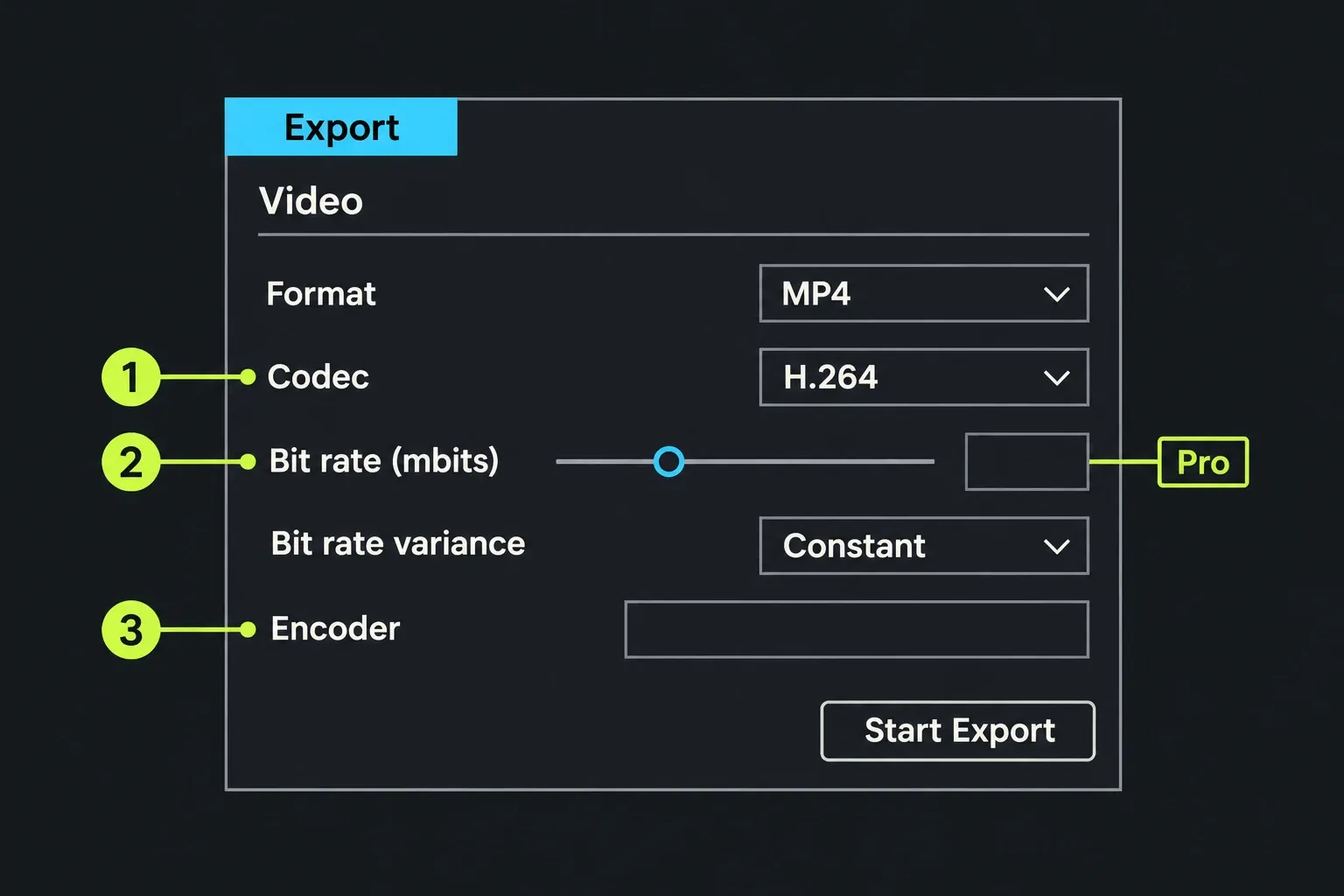
Lightworks changed its encoder after that test. The 2025.2 release notes describe GPU-accelerated H.264 encoding on compatible graphics cards. PCMag's 117-second result and 82-second gap belong to that project in Lightworks 2025.1; they are neither a current speed ratio nor a worst-case limit. Compare a short export of your own footage on current versions with the same resolution, codec, bitrate and available encoder before paying for a render-speed advantage.
Price and three-year cost
At the regular US$263.88 annual prepaid rate, three years of Premiere modelled at an unchanged price cost US$791.64 before tax. Adobe also advertises conditional first-year offers, so compare your checkout total and renewal price rather than treating this model as a guaranteed bill. Lightworks Pro costs €440 once or €750 on yearly renewals, and Create €215 once or €435 yearly. The billed-monthly Premiere rate comes from Adobe's US plans page; its annual prepaid offer lists US$263.88 as the regular annual price and Lightworks prices from the Lightworks pricing page in EUR before sales tax, so each stays in the currency its maker lists. Keep the currencies separate until you have local checkout totals; tax, regional pricing and renewal terms can change the comparison. The model below assumes the listed regular rates stay unchanged.
| Plan | First year | Three years | After you stop paying |
|---|---|---|---|
| Premiere, annual prepaid | $263.88 | $791.64 | Access ends with the paid year; no refund after the first 14 days |
| Premiere, annual billed monthly | $275.88 | $827.64 | Cancelling after 14 days costs a fee of up to half the remaining commitment |
| Lightworks Pro, pay once | €440 | €440 | Nothing to stop; the licence keeps working on the version you bought |
| Lightworks Pro, yearly | €250 | €750 | Account drops back to Free |
| Lightworks Pro, monthly | €384 | €1,152 | Account drops back to Free |
| Lightworks Create, pay once | €215 | €215 | Nothing to stop; the licence keeps working on the version you bought |
| Lightworks Create, yearly | €145 | €435 | Account drops back to Free |
| Lightworks Create, monthly | €216 | €648 | Account drops back to Free |
| Lightworks Free | €0 | €0 | Sign in every 90 days to renew |
Two details change the maths. A Lightworks pay-once licence provides ongoing use of the purchased version and edition. The EULA makes use subject to the applicable Order or Plan, so check that purchase's upgrade entitlement before pricing future major versions. The three-year pay-once row excludes any later major-upgrade purchase. Premiere's plan, on the other hand, includes Frame.io review links, Adobe Express Premium and 100GB of cloud storage, which earn their keep if you send cuts to clients for notes. The Free, Create and Pro comparison shows what each Lightworks plan adds.
Platforms and system requirements
| Requirement | Lightworks 2026.1 | Premiere 27 |
|---|---|---|
| Windows | Windows 10 or later, 64-bit; no Arm build | Windows 11 version 24H2 or later; Intel 6th generation or AMD Ryzen 1000 or newer with AVX2, or Snapdragon X |
| macOS | macOS 12 Monterey or later, Intel or Apple silicon | macOS 15 Sequoia or later; Apple silicon M1 or a later processor listed by Adobe |
| Linux | Ubuntu 22.04, Mint 21, Fedora 40 or later | Not supported |
| Memory | 8GB minimum, 16GB recommended | Windows: 8GB minimum (16GB shared on Arm); 16GB for HD and 32GB or more for 4K recommended. Mac: 8GB unified minimum, 16GB recommended |
| Graphics memory (Windows) | 2GB | 4GB, 8GB recommended |
| Activation | Lightworks account sign-in; a bought licence then runs offline | Internet connection and Adobe ID needed to activate and use |
Hardware can make this choice for you. Adobe's technical requirements for Premiere list Windows 11 24H2 as the minimum, and Premiere 26.3 began warning Windows 10 users that support will be removed in a future release, so a PC that can't take Windows 11 points to Lightworks. Premiere 27.0 requires macOS 15 and supported Apple silicon on Mac; its Windows graphics minimum is 4GB, with 8GB recommended. Mac uses a separate unified-memory requirement, so do not compare that Windows VRAM figure directly with an Apple-silicon machine. It runs natively on Snapdragon X laptops, though, where Lightworks has no Arm build for Windows. Check your machine against the Lightworks system requirements before you install either.
Editing, captions and effects
Both programs cut professionally. Where they differ is how much work they do for you.
- Cutting and trimming. Lightworks is built around keyboard editing and trimming, and the cut and trim tools are where it feels fastest. In a forum thread asking whether Lightworks beats Premiere, an editor with a film-cutting background found Lightworks the more natural fit. Premiere has a Trim mode too, opened by double-clicking an edit point, and PCMag calls its interface very flexible.
- Captions and transcripts. Premiere transcribes speech, turns it into captions, translates them into 27 languages and lets you edit by deleting transcript text. Lightworks has no automatic transcription. Its Pro subtitle row concerns a separate SRT export; the same row allows subtitles with YouTube uploads on every licence. Manually timed titles are another route for words that need to remain in the picture.
- Masking, tracking and stabilisation. Premiere's Object Mask selects and tracks a subject, and PCMag found its Warp Stabilizer very effective at smoothing bumpy video. Lightworks has no built-in motion tracking or stabilisation.
- Effects and motion graphics. Lightworks ships its own effects on every plan and adds OpenFX plugins on Pro, as the effects and plugins guide explains. For motion graphics, forum replies point Lightworks users to Fusion, while Premiere users reach for After Effects, which needs its own plan or the full Creative Cloud Pro bundle.
- Generative AI. Generative Extend lengthens a clip and the Generative Media Tool creates media from the timeline, both spending Adobe's generative credits. Lightworks has no generative tools.
I'd choose Premiere for repeated transcription and translated captions because those tools reduce manual transcript entry and timing work. Check names, terminology and caption timing on a representative clip before building the whole job around them.
Moving a project between Premiere and Lightworks
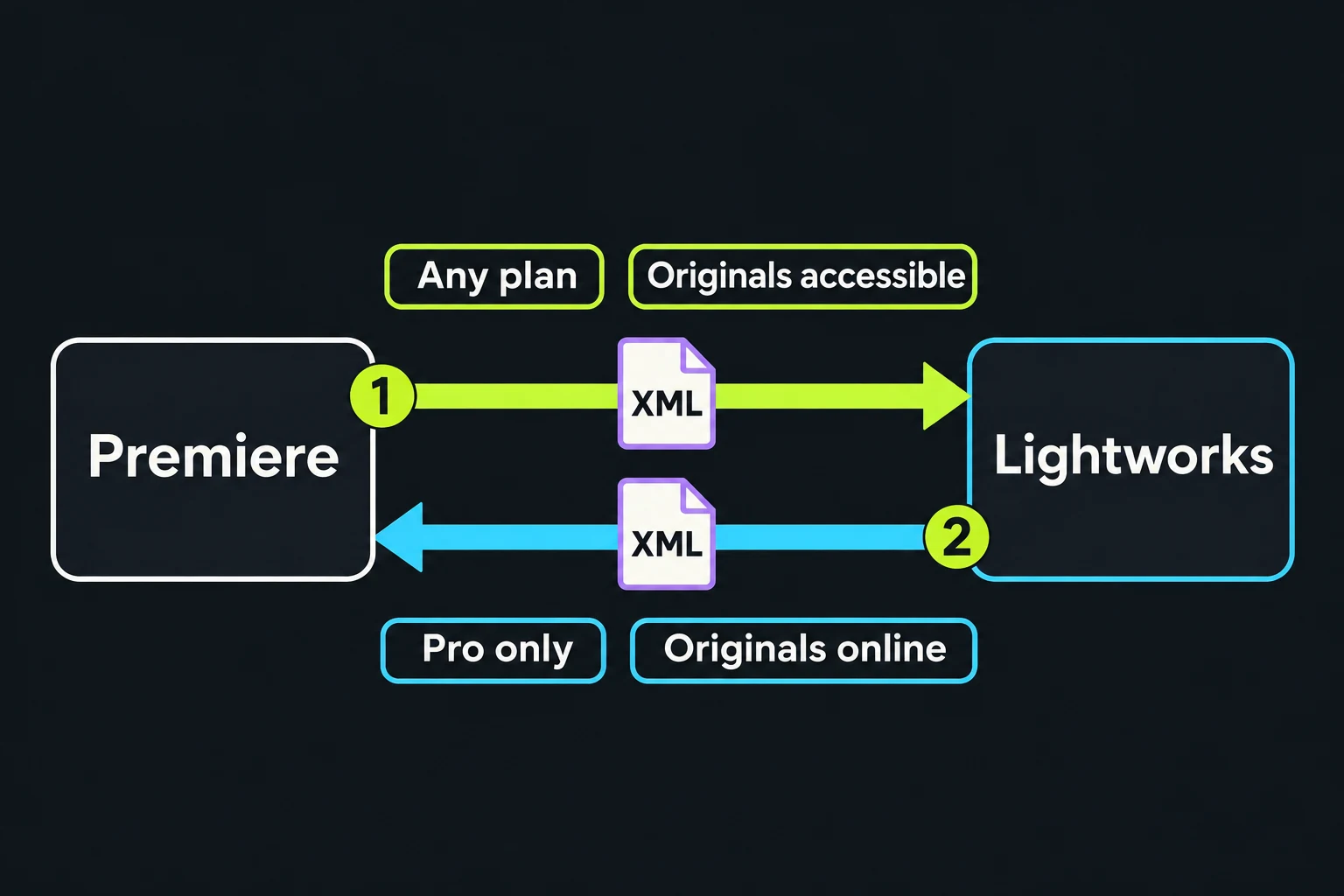
You don't have to choose forever. The Lightworks plan comparison lists exchange-format import, naming Adobe Premiere among the sources, on Free, Create and Pro, while exporting an exchange file back is a Pro feature.
Before a handoff, keep the native Premiere project and a separate copy of all original media. Export a reference video with the finished picture and sound, then transfer a representative sequence while Premiere is still available. XML describes an edit and points to media; it is not a project archive and does not contain the originals. Compare cuts, duration, titles, effects and the mix against the reference before depending on the new timeline.
From Premiere into Lightworks, any plan
- In Premiere, save the project, check that all media is linked, and choose File > Export > Final Cut Pro XML, as Adobe's XML export steps describe.
- Keep the original media accessible at known paths. The Lightworks import guide says Simple scan checks beside the interchange file and standard media folders; Thorough scan searches more widely. One organised transfer folder can help, but XML does not require moving every original into its own directory. Keep the source project's media intact.
- Import the XML through the Lightworks Import panel. If the referenced clips are offline, set AAF/XML media scanning in Import settings to Thorough and retry the import, or use the media-offline checks for the remaining clips. Match the original files rather than substituting proxies or same-named clips from another shoot.
- Check the cut against the original. Adobe warns that only a few Premiere effects transfer and that audio pan, gain and level changes may not come across accurately, so treat the import as a cut list and rebuild effects and mixes in Lightworks.
From Lightworks back to Premiere, Pro only
- Bring the original media online. AAF and XML files point at the originals rather than proxies, and a forum thread on failed AAF exports traced the failure to offline originals, so reconnect them before exporting from a proxy workflow.
- Export the sequence as XML.
- In Premiere, choose File > Import, select the XML and relink any clip Premiere can't find.
- Rebuild effects, titles and the mix in Premiere, for the same reason as above.
I'd try XML first and include freeze frames in the trial conform. The Lightworks 2025.1 release notes recorded an AAF freeze-frame issue with Premiere, so compare that part of the transfer in the actual versions you'll use. If the other editor only needs the finished video, skip interchange and send a master file made with the Lightworks export settings.
What happens when you stop paying
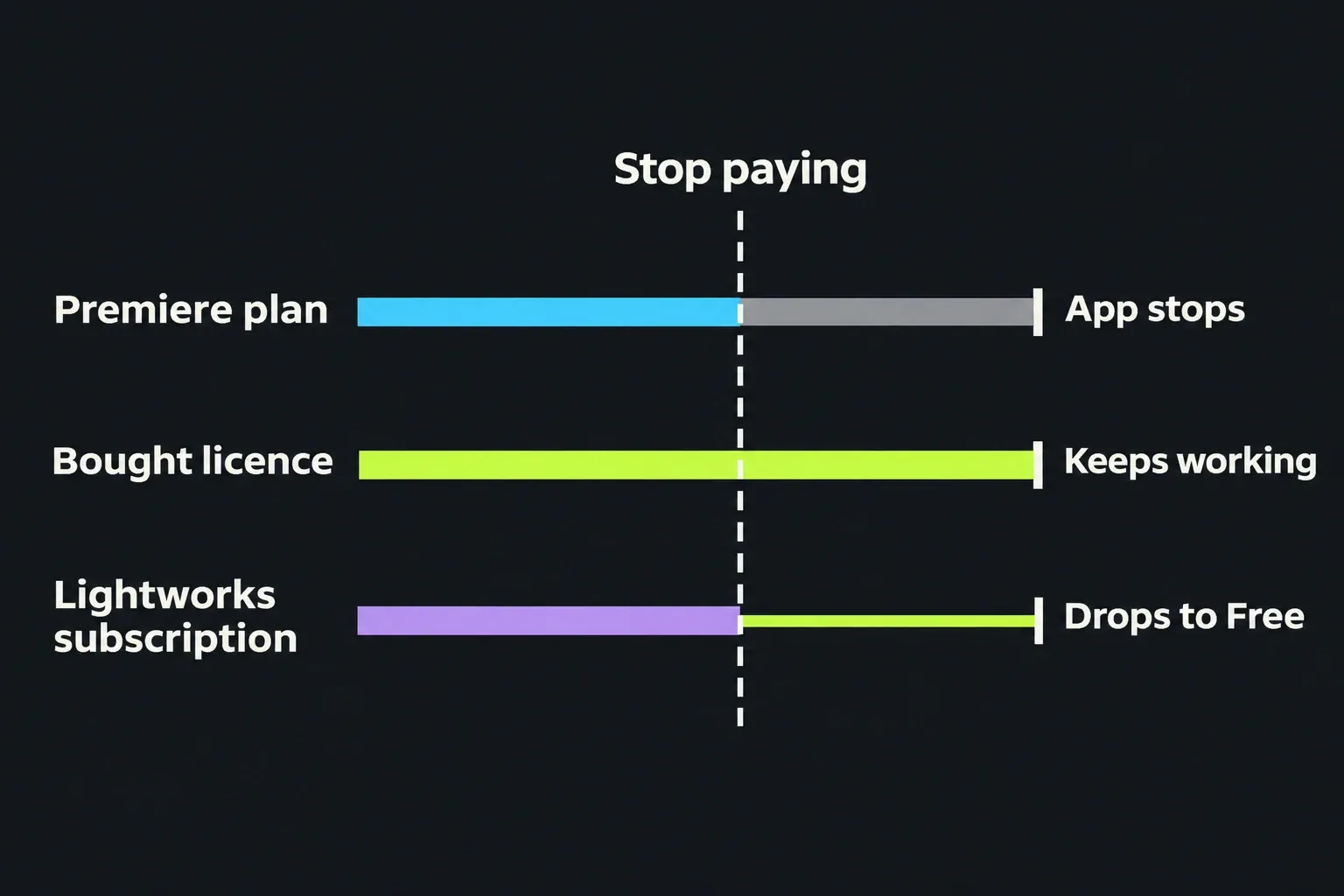
This is the biggest structural difference between the two. Adobe's cancellation help page says access to paid apps continues until the end of the current billing period, and after that Premiere stops working for you, so your Premiere projects wait until you subscribe again. Most plans get a full refund within 14 days of purchase; after that, the annual plan billed monthly charges a fee of up to half the remaining commitment, and the prepaid annual plan isn't refunded.
Lightworks offers a different exit route. The Lightworks FAQ says an activated pay-once licence runs offline for the version you bought; a lapsed subscription returns to Free, with 1080p MP4 export. Before a Premiere plan ends, keep its native projects, original media and reference/master exports, then test the XML import and finish the checks above while you can still reopen Premiere. I'd cancel only after that handoff works, because an XML file alone cannot restore missing media or every Premiere-specific effect. Keep the same separation of project and media in your Lightworks saving routine.
Who should pick which
Choose Lightworks if:
- you edit on Linux, or on a Windows 10 PC that can't move to Windows 11;
- you'd rather pay once, or not at all, than rent software;
- most of the job is selecting and trimming footage from the keyboard: interviews, documentaries, long-form YouTube;
- you deliver 1080p or 4K MP4 and the edit doesn't need Pro-only plugins, interchange or output controls; Free or Create can then meet the delivery.
Choose Premiere if:
- you need automatic captions, transcripts, caption translation or AI masking;
- clients, a school or a team already send Premiere projects or expect them back;
- your current-version H.264 export comparison shows a saving that justifies the subscription;
- you want Frame.io review links and a route into After Effects and Photoshop.
If you want free colour grading and effects in one program, the Lightworks vs DaVinci Resolve comparison covers that route, and for quick captioned social clips the Lightworks vs CapCut comparison is the better guide. The guide to what Lightworks Free includes lists every limit of the zero-cost option.
Verdict
Published scores favour Premiere, and captions, AI masking and Adobe project handoffs are the reasons I'd pay for it. The render gap above was recorded against Lightworks 2025.1, before its 2025.2 GPU H.264 update. Lightworks offers free 1080p export and a Pay Once option for ongoing use of the purchased version under its terms. It also supports Linux and Windows 10, which current Premiere requirements exclude. I'd recommend Lightworks to anyone learning, cutting long-form work on a budget or editing on Linux, because its trimming and keyboard workflow are what that work needs and the cost is zero or paid once. I'd recommend Premiere to anyone whose income depends on captions, client handoffs or Adobe teams, because its transcript tools and native project compatibility match that work. Start with a Lightworks Free install and the Lightworks keyboard shortcuts, and take Premiere's 7-day trial when a project needs what it adds.