
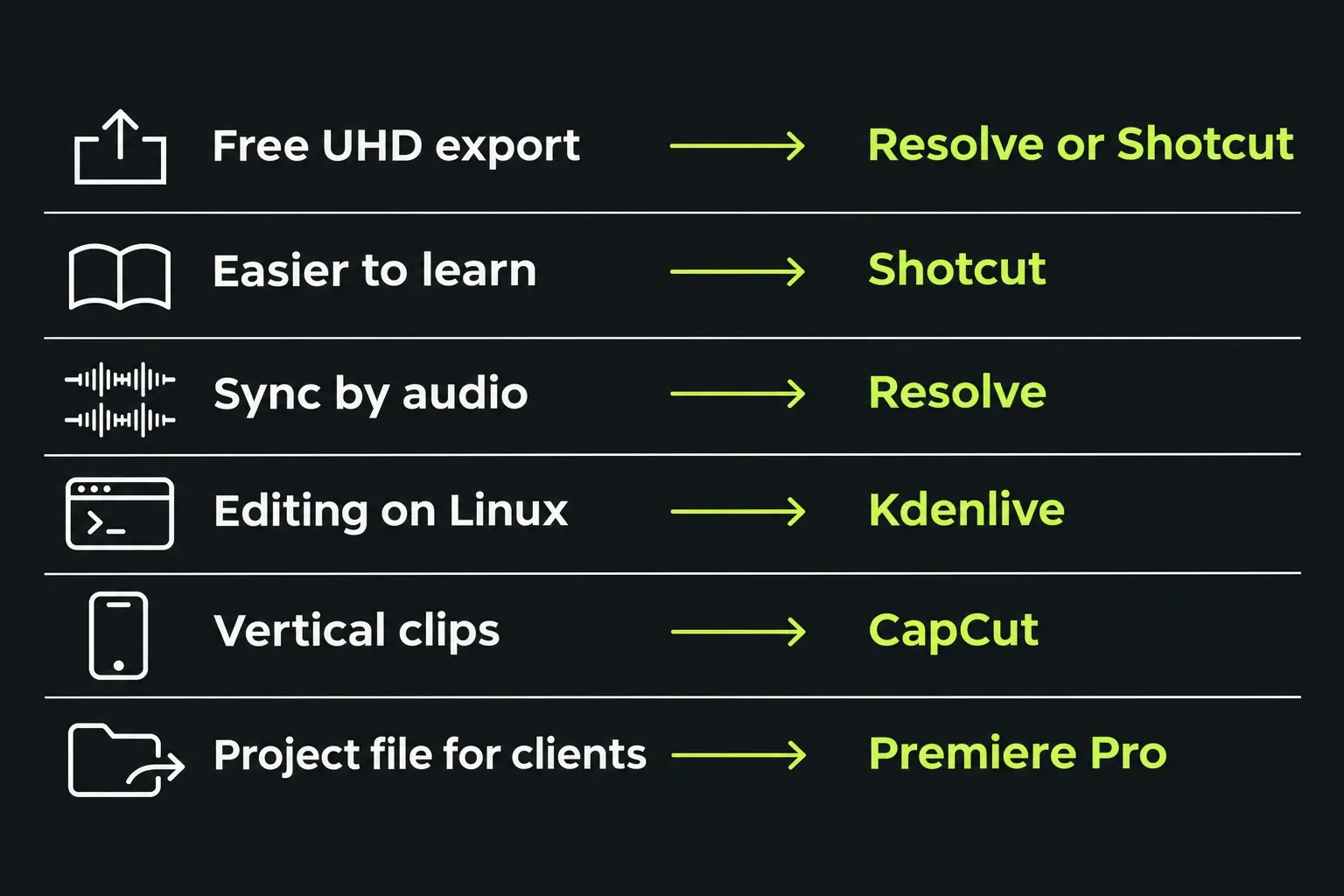
DaVinci Resolve is the best Lightworks alternative for most people: its free version exports Ultra HD at up to 60 fps, lines clips up by their audio and has the highest user score in this comparison, 4.8 from 494 reviews. If your computer is older or you want something easier to learn, Shotcut is free, open source and still runs on macOS 12. Kdenlive is the pick on Linux and CapCut for quick vertical clips, while Premiere Pro earns its subscription once clients start asking for the project file.
Check one thing before you leave. Lightworks 2026.1 lets the Free plan export 1080p MP4, portrait included, so the 720p ceiling quoted in many roundups is gone. If that limit was your reason to switch, the guide to what Lightworks Free includes shows what's left.
I'd start with Resolve if your computer meets its requirements, because its dedicated colour, Fusion compositing and Fairlight audio pages keep finishing work alongside the edit. Shotcut also offers colour tools, audio-based alignment and UHD export; Resolve's integrated finishing workflow is the reason for my recommendation. I'd choose Shotcut instead on an older Mac or a modest laptop, because Resolve 21 needs macOS 15 on Apple silicon and 16GB of memory on Windows, while Shotcut still installs on macOS 12 and Windows 10.
Pick an alternative by why you're leaving
People rarely leave Lightworks for one general reason. They leave because of a specific limit, and each limit points to a different editor. Find your reason in the left column.
| Why you're leaving | Pick | Why it fits | The catch |
|---|---|---|---|
| You want 4K export without paying | DaVinci Resolve or Shotcut | Resolve's free version exports up to 3840x2160 at 60 fps; Shotcut supports 4K and 8K | Resolve 21 needs Apple silicon and macOS 15 on a Mac and 16GB on Windows |
| The learning curve | Shotcut | Capterra users rate its ease of use 4.1, against 3.6 for Lightworks | No multicam on its feature list |
| Syncing cameras by audio | DaVinci Resolve | Auto Sync Audio lines clips up by waveform in the free version | Heavier on hardware than Lightworks |
| Free automatic subtitles | Shotcut or Kdenlive | Both turn speech into subtitle text at no cost | Resolve keeps automatic subtitles for the paid Studio version |
| You edit on Linux | Kdenlive or Shotcut | Both ship current Linux builds; Kdenlive adds multicam and automatic transcription | Resolve on Linux wants Rocky Linux, 32GB and Studio for H.264 |
| Short vertical clips for social | CapCut | Templates and effects built for short vertical video | Some templates add a watermark without Pro, and it uploads your content |
| Clients want the project file | Premiere Pro | The format agencies and post houses already pass around | Subscription only, from $22.99 a month on an annual plan |
| Mac only, one payment | Final Cut Pro | $299.99 once, or a monthly Apple plan | Needs macOS 15.6 or later |
| An old or slow computer | Shotcut, or stay with Lightworks | Both still run on macOS 12 and Windows 10 | Resolve is the wrong move on weak hardware |
What changed in Lightworks 2026.1
Lightworks 2026.1 became the stable release on 19 October 2026, and two of its changes weaken the usual reasons to leave. Free now exports 1080p MP4, portrait included, and the Lightworks pricing page asks Free users to sign in every 90 days to renew. The 2026.1 What's New page also describes trimming rebuilt from the ground up, which is the part of Lightworks its users defend hardest.
Search results haven't caught up. TechRadar's list of free video editors and G2's Lightworks alternatives page both still describe a 720p cap on Free. If 1080p is enough for your videos, the Free, Create and Pro comparison shows when paying for Lightworks makes more sense than moving.
Test results: scores and render speed
For scores, I followed the site's results method: I took the PCMag and TechRadar ratings out of 5 for each editor and used their median. The user composites shown combine Capterra and G2 ratings weighted by review count, leaving out any listing with fewer than 10 reviews. The totals add the two platforms' listed review counts; they are not counts of unique reviewers. Capterra's separate ease-of-use rating sits in the last column. All ratings were read on 23 October 2026.
| Editor | Outlet scores | Editorial median | User score | Ease of use |
|---|---|---|---|---|
| DaVinci Resolve | PCMag 4.0 (Nov 2025, Studio 20); TechRadar 4.5 (Jul 2025) | 4.25 | 4.8 from 494 reviews; Capterra 4.8 and G2 4.7 | 4.0 |
| Premiere Pro | PCMag 4.5 (May 2025); TechRadar 5.0 (Jun 2025) | 4.75 | 4.6 from 2,249 reviews; Capterra 4.7 and G2 4.5 | 4.0 |
| Final Cut Pro | PCMag 4.0 (Jan 2026) | 4.0 | 4.5 from 519 reviews; Capterra 4.7 and G2 4.4 | 4.3 |
| Shotcut | PCMag 3.5 (Sep 2017); TechRadar 4.0 (May 2022) | 3.75 | 4.4 from 120 reviews; Capterra 4.5 and G2 4.2 | 4.1 |
| OpenShot | TechRadar 3.0 (Jul 2022, version 2.6.1) | 3.0 | Not included in this snapshot | Not included in this snapshot |
| CapCut | PCMag 3.5 (Aug 2026); TechRadar 4.0 (Dec 2023) | 3.75 | No listing with 10 reviews | Not rated |
| Lightworks | PCMag 3.0 (Apr 2025, version 2025.1); TechRadar 4.0 (Jun 2022) | 3.5 | 3.9 from 65 reviews; Capterra 4.2 and G2 3.6 | 3.6 |
| Kdenlive | Not reviewed by either outlet | None | One G2 review, left out | Not rated |
In this ratings snapshot, critics put Premiere first and users put Resolve first. Scores from different years and editions help identify strengths and recurring complaints, but they do not decide whether a current build fits your footage, computer and handoff. Shotcut's outlet reviews date from 2017 and 2022, and OpenShot's from version 2.6.1; keep those versions attached to the numbers.
Render speed comes from one test bench. PCMag times editors on the same Windows 11 PC, an Intel Core i7-12700K with 16GB of RAM and an RTX 3060 Ti, exporting a project of seven clips from 720p to 8K with cross-dissolves, just over five minutes long, to 1080p30 H.264. Resolve finished in 27 seconds, Premiere in 35 and Lightworks 2025.1 in 117, 4.3 times Resolve's time and 3.3 times Premiere's. Two conditions apply: PCMag timed the paid Studio version of Resolve, and Lightworks ran on the Create plan before the 2025.2 release added GPU H.264 encoding, so those figures do not establish the speed ratio between current releases. PCMag's CapCut, Final Cut Pro and Shotcut times came from other machines, so they're left out of this comparison.
Free limits and prices
Every editor here has a free route, but the limits differ more than the price tags. Paid prices are list prices in each vendor's currency, before sales tax.
| Editor | Free version | Paid options |
|---|---|---|
| Lightworks | 1080p MP4, portrait included; sign in every 90 days | Create (4K) €18 a month, €145 a year or €215 once; Pro (8K) €32 a month, €250 a year or €440 once |
| DaVinci Resolve | 8-bit formats up to 60 fps at Ultra HD | Studio US$295 regular price; US$236 on promotion until 20 November 2026, excluding local duties and taxes |
| Shotcut | Free and open source, 4K and 8K | None |
| Kdenlive | Free and open source | None |
| OpenShot | Free and open source, no watermarks or project limits | None |
| CapCut | No watermark unless you use templates or assets that add one | Pro subscription; price varies by region, device and promotion. In Desktop, sign in, open the subscription button under your User ID and select Pro for your price |
| Final Cut Pro | 30-day trial | $299.99 once, or $12.99 a month or $129 a year in Apple Creator Studio |
| Premiere Pro | 7-day trial | US$22.99 a month on an annual billed-monthly plan; regular US$263.88 annual prepaid price, with conditional offers; subscription only |
Filmora turns up in plenty of alternative lists, but its free exports carry a watermark, and the one-time licence at US$79.99 covers updates within Filmora 16 only. CapCut's watermark depends on the template or asset used.
For commercial work, the Lightworks FAQ says Free output requires the Lightworks logo at the end and asks for a link in the posting description. The EULA makes the licence subject to your Order/Plan. If you need a commercial delivery without end credits, confirm the credit condition with LWKS for your specific Free plan before choosing it. An automatic watermark and an end credit are different conditions.
Will it run on your computer
Operating system cutoffs can rule an editor out before its features matter, and most alternative lists skip them. These are the current minimums from each vendor.
| Editor | Windows | macOS | Linux | Memory |
|---|---|---|---|---|
| Lightworks 2026.1 | 10 or later | 12 or later, Intel and Apple silicon | Ubuntu 22.04, Mint 21, Fedora 40 or later | 8GB, 16GB recommended |
| DaVinci Resolve 21.2 | 10 Creators Update or later, GPU with 4GB | 15 or later, Apple silicon only | Rocky Linux 8.6 or later, discrete GPU with 4GB | 16GB on Windows (32GB for Fusion); 8GB on Mac (16GB for Fusion); 32GB on Linux |
| Shotcut 26.9.27 | 10 and 11, including ARM | 12 or later; older builds for macOS 10.14 to 11 | Mint 21, Ubuntu 22.04, Debian 12, Fedora 36 or later | 4GB for SD, 8GB for HD, 16GB for 4K |
| Kdenlive 26.08.3 | 10 or later | 13 or later, Intel and Apple silicon | AppImage and Flatpak | 4GB for SD, 8GB for HD, 16GB for 4K |
| OpenShot 4.1.1 | Yes | Intel installer only | AppImage, Snap and PPA | Not stated |
| Final Cut Pro | No | 15.6 or later | No | 8GB, 16GB recommended |
| Premiere Pro | 11 24H2 or later, including Snapdragon X | 15 Sequoia or later, supported Apple silicon | No | 8GB on x86 Windows; 16GB shared on Arm; 8GB unified on Mac |
| CapCut | Yes | Yes | No | Not stated |
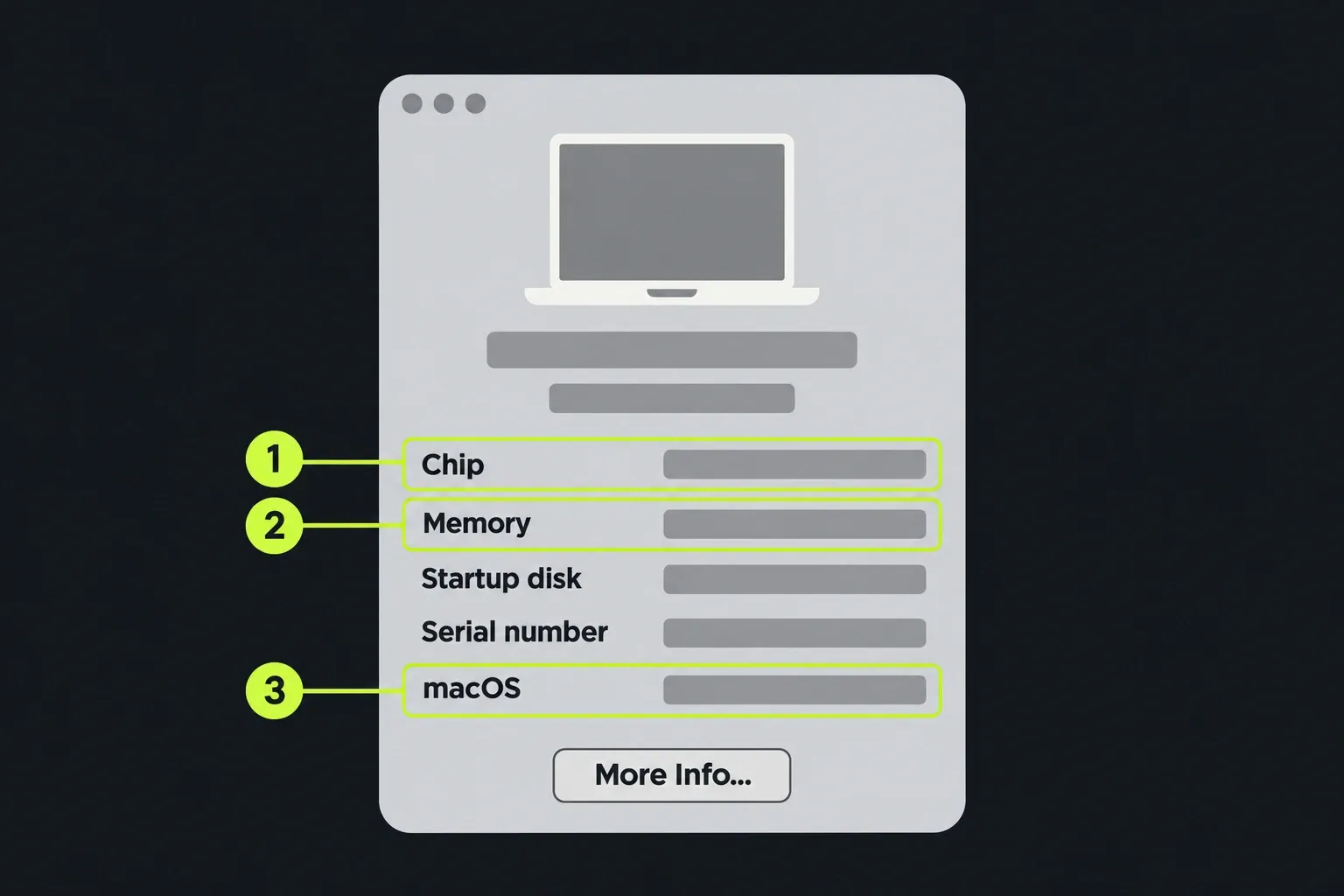
The Resolve 21.2 readme adds conditions beyond the OS names: Windows/Linux require OpenCL 1.2 or CUDA 12.8, with NVIDIA Studio 581.57 or later on Windows and 580.119.02 or later on Linux. Windows on Arm has separate processor and driver requirements. Check the section for your platform before installing, and keep project-library and individual-project backups before opening existing work in 21.2.
OS support only tells you whether an editor can install. For HD in Shotcut, check for at least 8GB of RAM and four CPU cores; 4K raises that to 16GB and eight cores. Near the minimum, its FAQ recommends both Proxy and Preview Scaling to reduce preview lag. Before moving a whole project, try a representative section with your camera files, titles and effects, export it at the delivery settings, then check picture and sound in the finished file. Keep Lightworks and the originals until that check works.
Two Resolve details catch people out. On Linux, decoding H.264 or H.265 footage needs Studio, encoding it needs Studio plus an NVIDIA card, and there's no AAC audio support. On Windows, memory matters: PCMag's reviewer hit a "Your GPU memory is full" message with full-resolution proxies and cleared it by halving the proxy resolution. Lightworks asks for 8GB and a graphics card with 2GB, and the Lightworks system requirements guide has its full list.
Lightworks vs Shotcut
Shotcut is the closest like-for-like swap: free, cross-platform and modest on hardware, with a simpler timeline. Lightworks keeps the edge in trimming, multicam and project exchange; Shotcut wins on free export resolution, automatic subtitles and ease of learning.
| Question | Lightworks 2026.1 | Shotcut 26.9 |
|---|---|---|
| Price | Free, with paid Create and Pro plans | Free and open source, no paid tier |
| Free export | 1080p MP4, portrait included | 4K and 8K supported |
| Ease of use (Capterra) | 3.6 | 4.1 |
| Subtitles from speech | No automatic captions | Converts spoken word to subtitle text |
| Audio sync | Waveform sync inside multicam bins | Aligns any clips by their audio |
| Multicam | Yes | Not on its feature list |
| Proxies | Yes | Low-resolution proxy editing |
| Project exchange | Imports AAF and XML on every plan; exports AAF, XML, OMF and EDL on Pro | Exports a CMX3600 EDL |
| Runs on | Windows 10, macOS 12, Ubuntu, Mint and Fedora | Windows 10 and 11 including ARM, macOS 12, Mint, Ubuntu, Debian and Fedora |
| Scores | 3.5 editorial median; 3.9 from 65 user reviews | 3.75 editorial median; 4.4 from 120 user reviews |
| Best for | Keyboard trimming, long interviews and documentaries, multicam | A first editor, free 4K, quick subtitles, older Macs |
The difficulty gap shows up in user reports too. In a Shotcut forum thread comparing editors, one person who'd used Lightworks, Kdenlive and Shotcut called Lightworks the hardest to master and Shotcut the easiest, and another mentioned Lightworks' real learning curve. I'd pick Shotcut for a first editor, because free 4K export and speech-to-subtitles cover most beginner projects without a plan to buy. I'd stay with Lightworks if your work is long-form cutting, because its trimming tools and keyboard shortcuts are where Shotcut can't match it.
Why Lightworks users move, in their own words
In the four Lightworks forum threads where users describe moving to another editor or adding one, from 2018 to 2026, every thread names Resolve. The reasons repeat:
- Audio sync. In a July 2026 thread on features professional editors miss, one editor whose team went from six Lightworks stations to one synced three cameras to the original WAV audio in Resolve in 10 to 15 minutes, then exported OMFs and imported them into Lightworks. Another user in the same thread said Lightworks syncs by waveform only inside multicam bins and doesn't do it as well as other editors.
- Handing over the project. The same editor said agencies always ask for the project at the end of a job, and Premiere's is the easy one to hand over.
- Features and stability over time. A self-described amateur on the second page of that thread said they'd used Resolve more and more over three years and now rely on it for interchange formats, and a long-time forum regular added that the free Resolve doesn't lack much for what many editors need.
- Media import. In a 2018 thread on using Resolve, a user found their camera's m2ts files imported instantly in Resolve, unlike in Lightworks at the time.
The same threads carry the counterweight. That 2018 thread also noted that Resolve needs significantly more powerful computers than Lightworks and a manual of over 1,200 pages, and in a 2021 thread on why Lightworks is underrated a user described Resolve as bloated and power hungry for some editors. If your machine struggles, moving to Resolve trades one problem for another.
The hybrid route: keep Lightworks for the cut
Before leaving an editor, keep its native project, the full original media and a reference/master export. Import a representative interchange sequence and compare the receiving timeline while you can still reopen the source application. The Premiere handoff steps show why XML alone is not a backup.
You do not have to leave completely. Some forum regulars sync and finish in Resolve and cut in Lightworks, passing a timeline as AAF or XML. Lightworks imports these on every plan; sending an editable interchange file back out requires Pro.
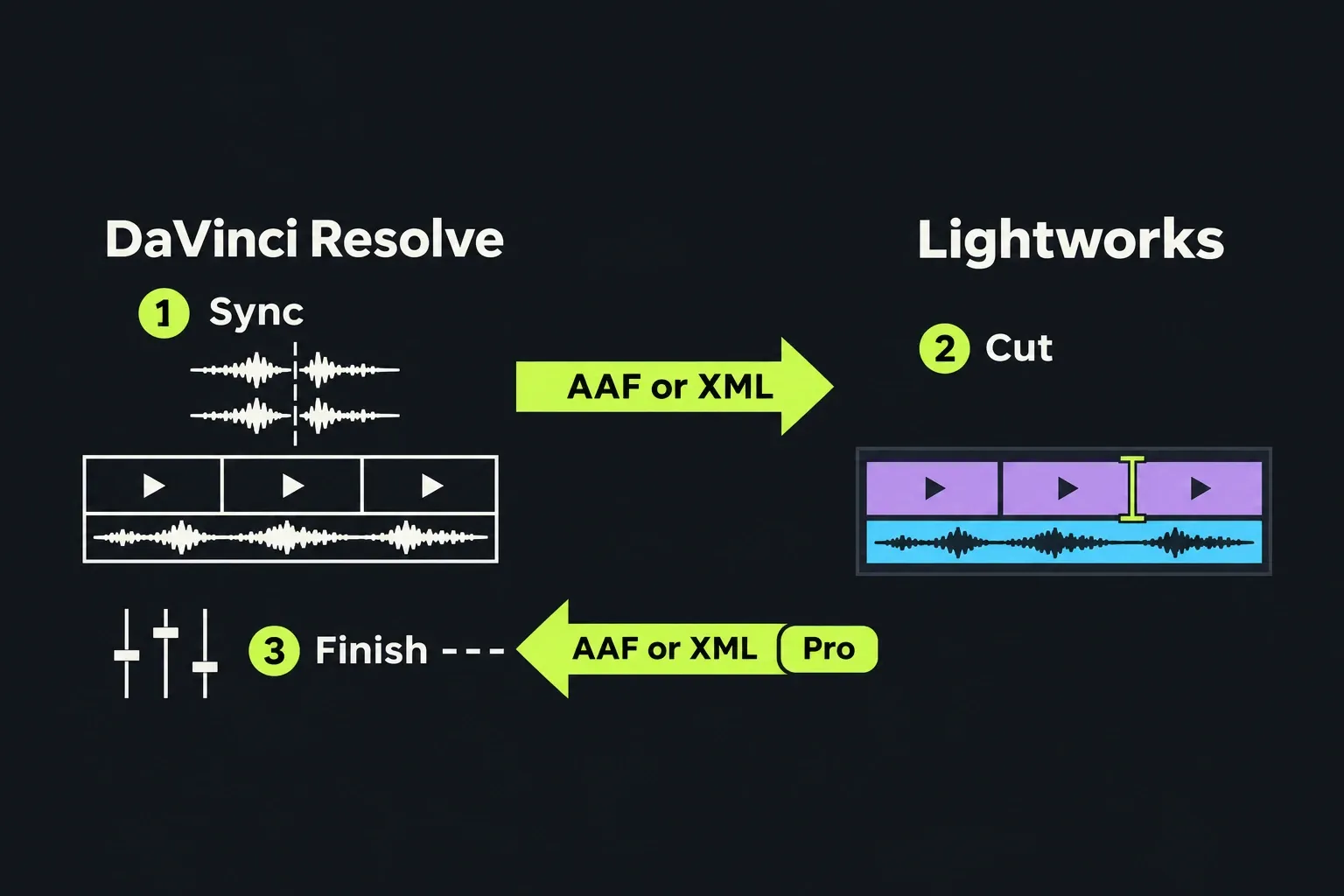
A 2022 forum guide to moving an edit between Lightworks and Resolve lists what breaks on the way: footage formats one side can't read, speed changes, mixed frame rates, variable frame rate clips and any effect beyond basic transitions. I'd try this route before switching for good if you like how Lightworks cuts, because it keeps your editing speed and only borrows Resolve for the jobs Lightworks does poorly. Include phone footage, screen recordings and speed changes in the transfer test. If a variable-frame-rate source causes a conform problem, transcode a copy and compare duration and sound sync before replacing anything; keep the originals.
Verdict
I'd choose DaVinci Resolve when you want colour, compositing and audio finishing alongside the edit, with free UHD output and audio sync. Its strong ratings and PCMag's historical Studio render are supporting evidence; the old timing does not establish a current speed advantage over Lightworks. If your Mac cannot run Resolve 21 or you want a simpler editing workflow, I'd choose Shotcut; on a modest PC, check its HD or 4K requirements against your footage before switching. Kdenlive is the natural home on Linux. I'd pay for Premiere Pro only when clients or a team expect Premiere projects, because a subscription that doesn't earn its cost back on paid work is hard to justify against free options this good. I'd keep CapCut for quick vertical clips and away from client footage, because PCMag notes it uploads a lot of your content to company servers.
And if your reason to leave was the 720p limit, look again: Free now exports 1080p, and the Lightworks review covers where 2026.1 stands. For head-to-head detail, read the Lightworks vs DaVinci Resolve comparison, the Lightworks vs Premiere Pro comparison and the Lightworks vs CapCut comparison. Staying put, start with the Lightworks download and install guide, set up proxies for heavy footage, and use the vertical video guide and YouTube export settings for the jobs people most often leave over.